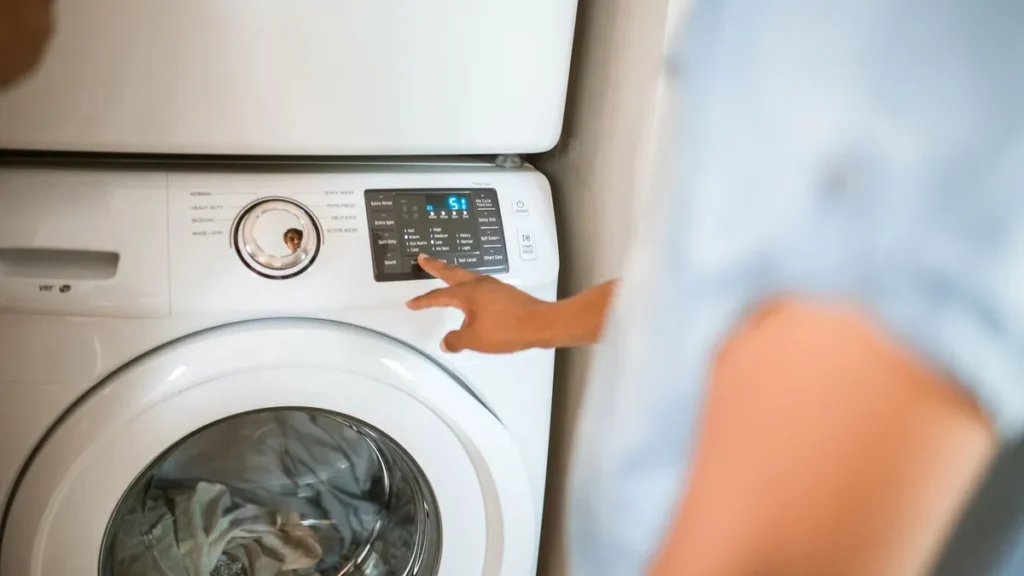
The LG washer CL code means Child Lock is turned on. It is not an error, and nothing is broken. Child Lock locks the control panel so nobody can change the cycle. To turn it off, power the washer on and press and hold your model’s Child Lock button, or the two buttons marked with a lock symbol, for 3 to 5 seconds until CL disappears.
Quick facts
| Code | CL (some models show a lock icon instead) |
|---|---|
| Appliance | LG front-load and top-load washers, washer-dryer combos and WashTower units |
| What it means | Child Lock is on; the control panel buttons are locked |
| Time needed | Under 1 minute |
| Difficulty | Easy |
| Most likely cause | The lock button, or button pair, was held by accident during a cycle |
The LG washer CL code confuses many owners because it looks like a fault. On LG washers (made by LG Electronics), it is simply a status message. For codes that do point to a problem, see our complete list of LG washer error codes.
What does the LG washer CL code mean?
CL stands for Child Lock. LG says the feature locks the control panel during a cycle to stop children or other users from changing settings. LG’s own error code list notes that CL “is not an error.”
While Child Lock is on, LG says all buttons except Power stop working, so Start and the cycle controls do nothing. That is why the washer can seem frozen. The lock also stays on after the cycle ends and even after you turn the washer off, according to LG, so you will see CL again the next time you power it up.
What causes the LG washer CL code to appear?
Something held the lock button, or lock button pair, for about 3 seconds while a cycle was running. LG says Child Lock can only be switched on with a cycle in progress.
| Cause | How to check | Fix | DIY difficulty |
|---|---|---|---|
| Someone turned Child Lock on deliberately | Ask the household; check if CL lights up when you press Power | Hold the lock button(s) for 3 to 5 seconds | Easy |
| Lock button held by accident | Look for a lock icon under Spin, Steam, or between Temp and Rinse | Hold the same button(s) again to unlock | Easy |
| Lock left on from an earlier cycle | CL appears as soon as you power on | Unlock with the washer powered on | Easy |
| Wrong buttons being pressed | Nothing changes after 5 seconds | Check the lock icon on your panel or your owner’s manual | Easy |
| Control panel fault | The correct button(s) do not respond at all | Contact LG or a technician | Pro only |
How do you turn off the LG washer CL code? (step by step)
The button you need depends on your model. LG says to disable Child Lock the same way it was enabled, so find the lock icon on your control panel first.
Total time: 2 minutes
Turn the washer on
Press Power. LG says the washer must be powered on before you can turn Child Lock off, and the CL message or lock icon will light up.
Find the lock icon on the control panel
Look for a small padlock symbol or the words Child Lock, Control Lock or CL. On many LG washers it sits under the Spin button, under the Steam button, or on a line joining two buttons such as Temp and Rinse.
Press and hold the lock button for 3 to 5 seconds
On a single-button model, hold that one button. LG lists Spin for models with a Child Lock label and Steam for models with a Steam feature.
Or hold both lock buttons together
If the lock icon sits between two buttons, press and hold both at the same time for 3 to 5 seconds. On LG models with this layout, the pair is often Temp and Rinse.
Check that CL has cleared
The CL message or lock light should go out. Press a cycle button to confirm the panel responds.
Start your cycle
Choose your settings and press Start/Pause. If the buttons still do not respond, turn the washer off and try the hold again, keeping steady pressure for the full time.
On a WashTower, LG says the washer’s Child Lock is on the Spin button, while the dryer’s Child Lock uses the Timed Dry button. Each unit locks and unlocks separately.
Is it different on top-load vs front-load models?
Not really. LG sorts its Child Lock steps by button layout, not by washer type, so a top-loader and a front-loader with the same button style work the same way.
Single-button models
- The button may be labeled Child Lock, Control Lock or CL, or show a lock icon.
- LG says to hold it for 3 to 5 seconds to switch the lock on or off.
Two-button models
- Two neighboring buttons share a lock symbol.
- Hold both together for 3 to 5 seconds.
Steam and WashTower models
- LG says Steam models use the Steam button.
- WashTower washers use the Spin button on the washer panel.
If none of these match your panel, check your owner’s manual. LG notes that the exact method varies by model.
How do you reset an LG washer after the CL code?
You do not need a reset for CL, because it is a setting, not a fault. You simply turn the lock off.
- Press Power to turn the washer on.
- Hold the lock button, or lock button pair, for 3 to 5 seconds.
- Confirm CL has gone out, then choose and start your cycle.
Unplugging the washer will not clear Child Lock, because LG says it stays on even when the washer is powered off. If the display shows a different code once CL is gone, look it up in our LG washer error codes guide.
⚠️ Safety first
- Child Lock locks the control panel only. Keep young children away from the washer door and the drum at all times.
- Never let a child climb into or play inside a washer or dryer.
- If you need to check anything behind the washer, unplug it first.
- Disconnect power at the breaker before removing panels.
When should you call a technician?
Most CL codes need no repair at all. LG says that if the Child Lock buttons do not respond, it could be a malfunction, and you should contact customer support. Clear signs include:
- You are holding the right button(s) for at least 5 seconds with the washer on, and CL never clears.
- Other buttons, including Power, also fail to respond.
- CL turns on by itself during cycles when nobody touched the panel.
- The control panel shows cracks, moisture or stuck buttons.
These point to the control panel or main control board, which a technician should diagnose.
How can you prevent the CL code from surprising you?
A few habits keep the lock from catching you out.
- Learn where the lock icon is on your panel and tell everyone in the house.
- Turn Child Lock off at the end of the cycle if you only needed it for one load.
- Avoid leaning on the panel or resting laundry baskets against it during a cycle.
- If you have young children, leave Child Lock on during cycles and teach adults how to clear it.
Frequently asked questions
How do I get CL off my LG washer?
Power the washer on, then press and hold the Child Lock button, or the two buttons sharing the lock symbol, for 3 to 5 seconds. The CL message should go out and the buttons will work again.
Why won’t my LG washer start with CL on the display?
With Child Lock on, LG says every button except Power is disabled, including Start. Turn Child Lock off first, then choose your cycle and press Start/Pause.
Does unplugging an LG washer turn off Child Lock?
No. LG says Child Lock stays on after the cycle ends and even when the washer is powered off. You have to switch it off with the lock button(s).
Which buttons turn off Child Lock on an LG washer?
It depends on the model. LG lists Spin on models with a Child Lock label, Steam on Steam models, and Temp plus Rinse held together on models where the lock icon joins two buttons.
Can I open the door when CL is showing?
LG describes Child Lock as a lock on the control panel buttons. If the door stays locked after the cycle has finished, treat it as a separate door lock issue; see our LG washer DE code guide for door lock problems.
Is the CL code the same on Maytag washers?
Maytag washers can also show CL, but the buttons and steps are Maytag’s own. See our Maytag washer CL code guide for those models.
Related error codes
- LG washer error codes: full list with meanings and fixes
- LG washer DE and DE2 code: door errors
- LG washer TCL code: tub clean reminder
- LG washer UE code: unbalanced load
- LG washer OE code: washer won’t drain
- LG washer PF code: power failure
- Maytag washer CL code: control lock